

What “Live” Actually Means
I want to be specific about this because “live” can mean a lot of things depending on who’s saying it. Here’s exactly what’s running right now.
A React dashboard is loading at shomer.cookiebytestech.com behind a real SSL certificate. A Node.js backend is running inside a Docker container on our home server, Tank. A SQLite database initialized itself on first start and created every table the system will ever need — users, tags, events, plants, pets, maintenance schedules, points, streaks, badges, Google auth tokens, settings, all of it. Both my account and Emily’s were seeded automatically and are ready to go.
The wall display is live. It’s a scoreboard designed to be mounted on the wall and left running — shows household XP, individual scores for Norm and Emily, overdue maintenance, recent activity, and pet feeding status. It refreshes every 60 seconds on its own. We built it specifically for a Kindle Fire mounted in the kitchen.
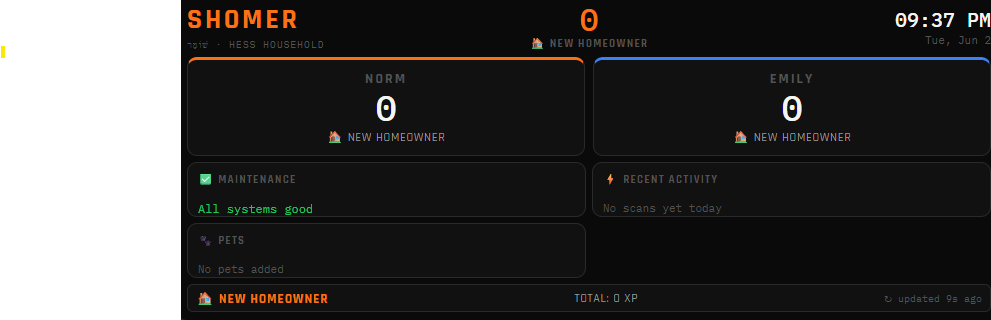
Everything shows zeroes right now because no tags have been registered and no data exists yet. But the infrastructure underneath it is solid, and that was the entire point of Phase 1.
What It Actually Took
I want to be honest about the build because I think that’s more useful than making it sound like it all just worked.
The core architecture came together cleanly. Docker Compose manages all four containers on Tank from a single file: Wire (n8n), Ink (DocuSeal), Shomer’s backend, and Shomer’s frontend. Apache routes the API and webhook traffic to the backend and everything else to the frontend. Virtualmin handles the SSL cert. The whole setup is consistent with how the rest of Tank’s services work, which made it easier to fit in.
That said, a few things required more debugging than I expected.
The biggest headache was shell interpretation. When you’re writing Node.js files to a Linux server by pasting through a terminal, characters like the exclamation point get read as bash history expansion commands and break things mid-paste. You end up with a half-written file and an error that makes no sense until you figure out what happened. The fix was using printf or nano directly on the server instead of heredocs. Noted permanently for future builds.
The session cookie needed a specific combination to survive Apache’s reverse proxy. Without secure: true paired with sameSite: none, every login request succeeded and then the session dropped immediately on the next request. So the login would work, you’d get redirected to the dashboard, and then it would bounce you back to the login screen. Two lines of config, about thirty minutes of debugging.
The Apache vhost also needed explicit proxy rules for the API, webhook, and health check endpoints before the frontend catch-all rule. Otherwise nginx was intercepting every backend request and serving index.html instead. Order matters in Apache proxy configuration and it’s easy to miss if you’re not thinking about it.
None of those were showstoppers. They’re the normal friction of building on real infrastructure instead of a managed platform. You hit the problem, you figure out what’s actually happening, you fix it and move on.
What It Looks Like
Dark background. Orange accents, same orange as the CookieBytes brand. Rajdhani for the headers, IBM Plex Mono for data. I’ve been calling the aesthetic “industrial command center” because it feels functional and slightly dramatic at the same time, and I think that fits a system called Shomer.
The sidebar has eight sections: Dashboard, Tags, Plants, Pets, Maintenance, Event Log, Reports, and Settings, with the Wall Display link at the bottom. The main dashboard shows the Hess Household banner with total XP, score cards for Norm and Emily side by side, a Due Soon panel for maintenance coming up in the next five days, pet feeding status, the last six NFC tag scans, and earned achievement badges.
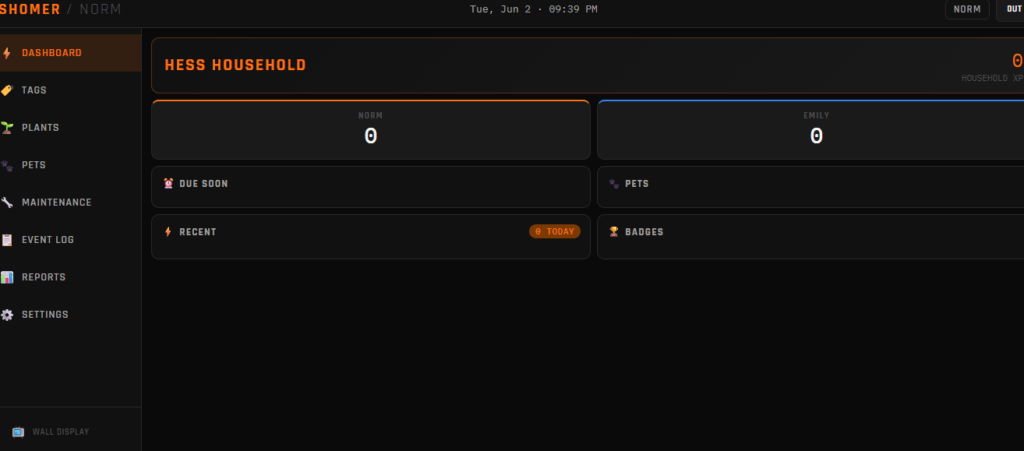
Everything was built with the Kindle Fire 7 screen in mind. That’s 1024 by 600 pixels, and the design needs to be readable from across a kitchen counter. It works fine on desktop and mobile too, but the wall mount is the primary use case for the scoreboard view.
There’s a principle from the book The 4 Disciplines of Execution that stuck with me when we were designing the wall display. The authors make the case that one of the most powerful things you can do to keep people moving toward a goal is to put a compelling scoreboard somewhere they can’t avoid seeing it. Not a report buried in an app, not a notification they’ll swipe away, a physical, always-visible display that answers two questions at a glance: are we winning, and what needs attention today?
Most productivity systems fail not because the goals are wrong but because the feedback loop is too slow and too invisible. You forget what you’re tracking, you skip a week, and the momentum is gone. A scoreboard changes that. When you walk past the kitchen and see that the dogs haven’t been fed in 14 hours, you feed the dogs. When you see that Emily has a three-week streak and you don’t, you tap the card. When you see the HVAC filter is four days overdue, you change it before it slips to a month overdue. The information being visible is what makes the behavior happen.
That’s the whole point of the Kindle on the wall. It’s not a cute UI feature. It’s the part of the system that actually makes the other parts work.
The Naming
Every tool in the stack has a single word as its name, English or Hebrew, that describes what it does at a fundamental level. In This case, Shomer watches.
Shomer (שׁוֹמֵר) is Hebrew for watchman or guardian. It’s the word from Isaiah 62:6: “I have set watchmen upon thy walls.” For a system that watches over your home, tracks what’s been maintained, guards the schedule, and tells you when something needs attention, that name isn’t just a clever choice. It’s accurate.
The wall display shows you what the watchman sees. That wasn’t a coincidence.
What Comes Next
Phase 1 was infrastructure. Phase 2 is features.
The Tag Manager gets built first so you can scan a physical tag, give it a name, assign actions to it, and have it actually do something when you tap your phone to it. No terminal, no config files, just the dashboard. The first tag is already sitting on my desk: a hotel key card.
After that it’s the Pet Manager. We have four dogs and two cats and the feeding card is the most immediately useful thing in the whole system. One tap and both phones know who fed them and when. No more asking each other. No more looking at the dogs while standing by the dog food bin wondering did they eat already while they act as if they’re starving.. Yeah they know what they’re doing.
The Maintenance Tracker comes next, along with the Home Sale Report preset. That’s a one-click PDF of every maintenance event ever logged, sorted by category, with dates and photos attached. The kind of document most homeowners can never produce but that makes a real difference when it’s time to sell.
The Plant Manager uses the Claude API. A short setup wizard collects details about the plant and sends them to an AI model that generates a personalized watering schedule with seasonal adjustments built in. Alabama summers are different from October, and the system accounts for that automatically.
Then N8N integration, which is what makes a tag scan actually fire notifications, Spotify playback, Google Home routines, and timers instead of just writing to a log.
Each piece gets documented here as it gets built.
What This Means for You
If you’ve been following this series, you’ve watched a complete self-hosted home automation system go from a conversation about hotel key cards to a running dashboard in real time.
The physical infrastructure cost: a home server that was already running, a domain name, a free SSL cert, and a $10 pack of NFC stickers. That’s it.
The value of a system that tracks your home maintenance, keeps your household in sync, turns daily tasks into something you actually want to do, and hands you a professional maintenance log when it’s time to sell is harder to put a number on.
I build these for clients. If you want one customized to your home, your appliances, and your actual daily life, that’s what CookieBytes does. Reach out and let’s talk about what your version of Shomer looks like.